
Concept map
A lesson's concepts and their prerequisite links, with where you stand on each. The map answers three questions during a lesson: where do I come from, where am I, what comes next. Exported, it becomes a page you can explore: open a concept to see the questions you went through, who assessed each answer, and what the teaching of that concept rests on.
The map states what happened in the session. It does not certify that a concept is learned, and it does not check whether a source is right.
What a state means
| State | Meaning |
|---|---|
| acquired | Your latest assessed answer on the concept is right, or the session credited it as a prerequisite |
| to review | Your latest assessed answer on the concept is wrong |
| current | The scene on screen belongs to this concept |
| seen, not yet assessed | You went through scenes of the concept, and no key or judge assessed an answer |
| upcoming | Not reached yet |
States come from session facts: the scenes served, the answers assessed, the prerequisites credited. The
state field of get_workflow_graph reads estimated mastery instead and serves another purpose.
In the conversation
The lesson shows the map at a few moments, not on every question: when it opens, at a detour through a
prerequisite and on the way back, on a scene that draws on several concepts, and at the end. When a new
concept opens, one line says where you are. Ask for the map at any time: your assistant calls
get_workflow_graph and shows concept_map. A harness that draws diagrams can render
concept_map.mermaid.
In the lesson panel
In the lesson panel and in the Claude Code pane, « Concept map » opens the map as a list under the scene. Nothing is submitted and the scene stays where it is. Each concept says its state in words and what it needs first. « Evidence and scope » shows what the state establishes, what it does not, and the answers behind it: the day, who assessed the answer, the result and the hints taken. Where a concept can be checked, a button states your claim (« I know it » or « I am not sure »): the lesson then asks one or two check questions and says what they showed. A question whose answer you have already been shown is not asked again: when only such questions are left on a concept, it cannot be checked again in this lesson. A concept the session has not shown yet cannot be contested until it is reached. Your claim alone changes nothing. « Close the map » puts the list away. The panel does not draw the graph; the exported page below does.
Export an interactive page
Ask your assistant to export the map. It calls export_concept_map, which writes a record under your
library (<STUDIUM_HOME>/library/_exports/concept-maps/) and returns its path and SHA-256. Then, from the
repository root:
.venv/bin/python tools/concept_map_report.py export RECORD.json reports/concept-map --expect-sha256 SHA256
.venv/bin/python tools/concept_map_report.py verify reports/concept-map
Open reports/concept-map/index.html. The page needs no network and no server. Your assistant's
procedure for all of this is the studium-concept-map skill (Skills).
| On the page | What it does |
|---|---|
| A concept of the graph | Opens its panel: prerequisites, your steps, sources, trace nodes |
| A step of the session path | Opens the concept of that step and highlights the step |
| Viewpoint: Learner | Colours concepts by state; shows your steps and the path travelled |
| Viewpoint: Teacher | Shows the structure, what each concept rests on and, when attached, the class figures |
| Concepts shown | Dims the concepts of a state |
The record holds no learner identifier and none of your words: results, not answers. For each answer it
also keeps the day, the hints you took before it and whether you then rated your own recall, and, for each
concept you contested (« I know it », « I am not sure »), what the check questions showed. It stays on your
machine until you share the folder. forget_session does not delete exports; it names the folder so you
can delete it yourself.
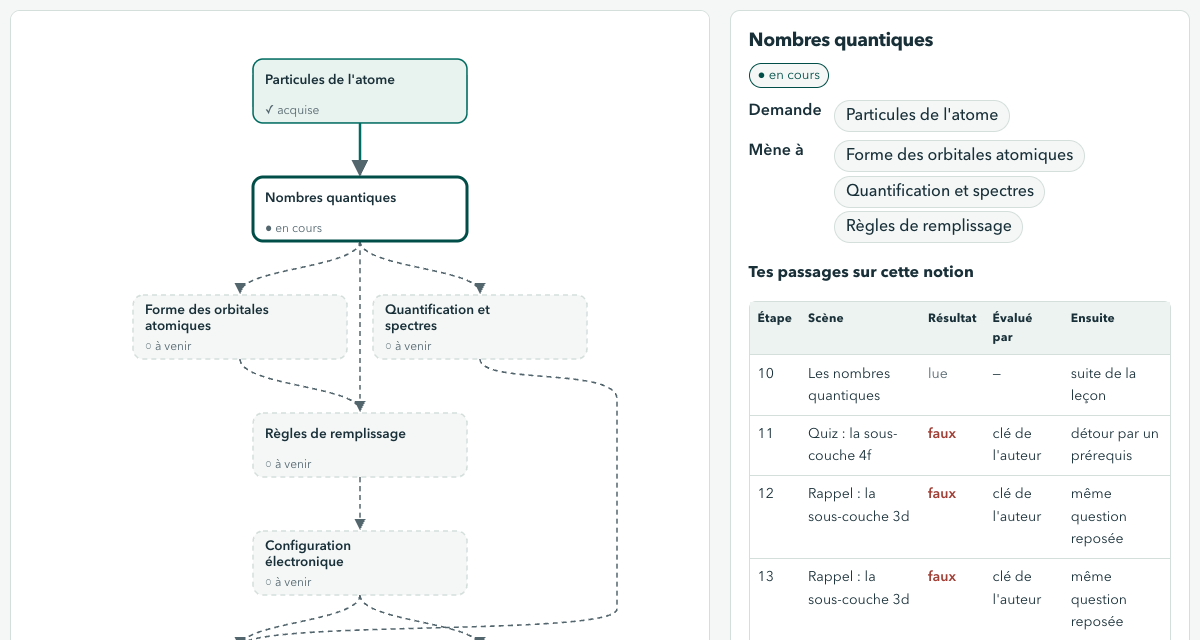
The concept map exported after a session (synthetic learner): where each concept stands, and the answers behind it.
What a concept rests on
For each scene of a concept, the panel gives the kind of key (written by the author, a production compared with a reference, grounded by a run, or not graded), the sources cited and where each comes from: a web page, a publication, a supplied document, or a conversation with an AI assistant. A passage is quoted only once you have left the scene that cites it, because a passage can state the key of its question. The header says who drafted the lesson and whether a teacher validated this exact version (a lesson changed since its approval says so).
For a lesson drafted from a conversation, read learn with your assistant: what an assistant asserted there was not checked.
The teacher viewpoint and class figures
A teacher who wants the figures of a class on the map exports the class report with the teacher tool
class_report, saves its JSON, and passes it (the JSON written by tools/class_report.py also works, run with
--bundle path/to/lesson.json so its rows are named by concept):
.venv/bin/python tools/concept_map_report.py export RECORD.json reports/class-map --class-report class-report.json
Each concept then shows its success rate (over the graded answers, whose number is given when it is lower than the answers' own), hint reliance, calibration gap and mean time, and the concepts
to reteach first are marked. Figures under the learner floor of class_report are not shown, and no
individual figure exists in that report. The page still holds the session path of the record it was built
from: for a page without any learner's path, export the record from a session just started.
Provenance files
| File | Standard | Content |
|---|---|---|
sources/concept-map-record.json |
Studium record | The record the server wrote, copied unchanged |
astra.yaml |
ASTRA 0.0.14 | The record as a declared artifact, the choices made (state rule, passages quoted, class figures) and technical findings |
trace/exploration_tree.yaml |
ARA 0.1.0 | The session path: one node per step, one pivot per detour |
course_provenance.myst.md |
MySTRA | The same provenance as a readable page, with the map |
report.json, checks.json |
Studium | The summary and its limits; the digest of every file and the ASTRA validator's result |
Your results stay in the declared record; they are never written as custom ASTRA fields. To read the package in the Observatory, point its course root at the parent folder, as for a learner report.
Verification recomputes the summary, the ASTRA document, the trace and both pages from the record, runs
the installed astra-tools validator and checks every digest. The manifest is unsigned: it detects stale
or changed files, and someone who can rewrite the whole folder can rewrite its digests too.
Limits
- Whether a map helps learning has not been measured.
- A lesson resumed after a server restart keeps its latest steps and their results (the saved history is bounded); who assessed each earlier answer and how the session routed are recorded only for the steps played since the restart.
- Mermaid rendering in each harness was not checked by eye; the list form is always present.